Benchmarking NumPy vs JAX vs PyTorch#
Introduction#
When working with numerical computing in Python, three libraries dominate the landscape: NumPy, JAX, and PyTorch. Each has its own strengths. NumPy is the foundational array library, JAX brings automatic differentiation and XLA compilation, and PyTorch offers a flexible deep learning framework with eager execution.
But how do they actually compare in raw performance across common numerical operations? This post walks through a benchmarking suite that pits all three against each other on both CPU and GPU, across a range of operation types and tensor sizes.
Test Hardware#
All benchmarks were run on the following system:
| Component | Specification |
|---|---|
| GPU | NVIDIA GeForce RTX 4060 |
| CPU | AMD Ryzen 7 5700X |
| RAM | 32 GB DDR4 @ 3800 MT/s |
And the libraries used were the following at the time of writing:
| Library | Version |
|---|---|
| JAX | 0.9.2 with CUDA 12 (the CUDA 13 build was not working on my side) |
| PyTorch | 2.10.0 with CUDA 13 |
| NumPy | 2.4.3 |
All libraries were installed using uv, thus not all optimizations were enabled.
But as most Python projects now rely on uv, this represents the usual workflow of a Python developer.
You can run my benchmark on your machine using the source code.
Benchmarked Operations#
The suite covers five fundamental numerical operations, each tested at two scales: a small tensor size and a large tensor size. This reveals how overhead and throughput characteristics change with data volume.
1. Element-wise Operations#
Element-wise add, multiply, and sine are the bread and butter of array computing. These operations are memory-bandwidth-bound and test how efficiently each library can push data through simple per-element kernels.
On this test, the setup was as follows:
- Small: arrays of size 1,000
- Large: arrays of size 1,000,000
- Iterations: 500 (small), 100 (large)
For each library, the benchmark executes:
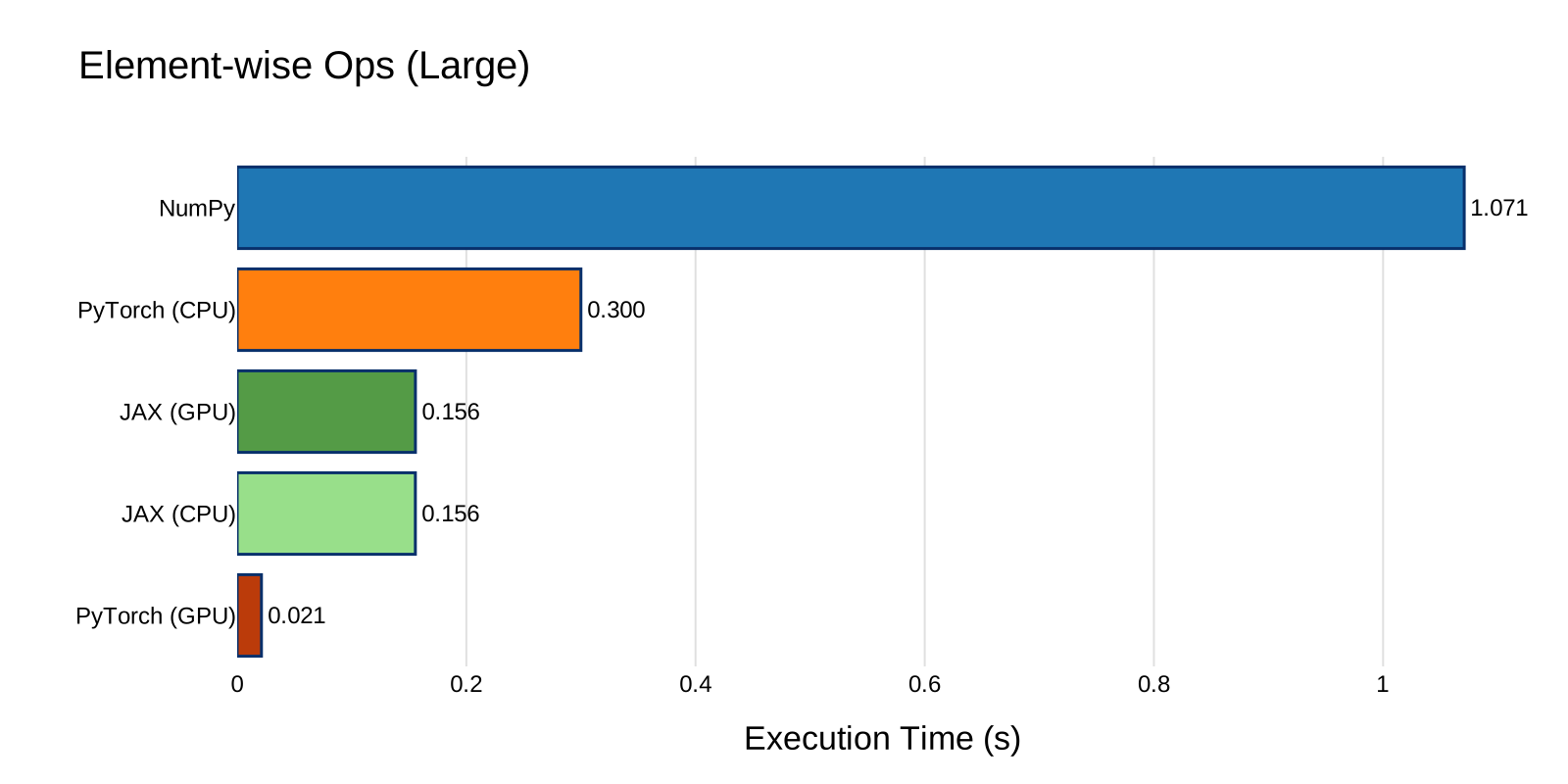
At small sizes, dispatch overhead dominates. The time to launch a kernel or call into a C extension matters more than the actual computation. At large sizes, memory bandwidth and vectorization take over.
This is shown in the following figures:
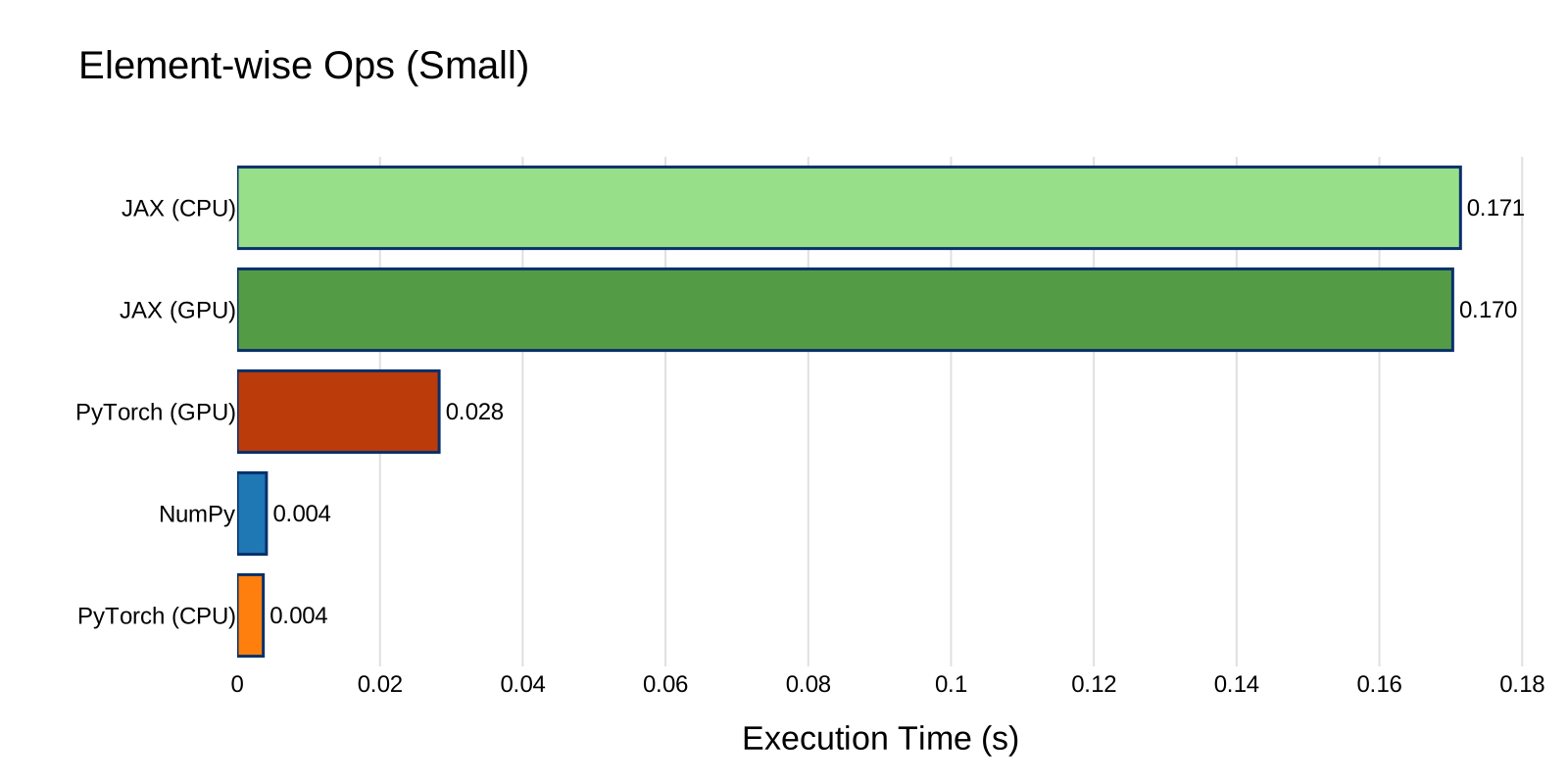
At small scale, PyTorch CPU and NumPy are nearly tied (~4 ms for 500 iterations), while JAX pays a heavy dispatch overhead (~170 ms) regardless of device.
At large scale, PyTorch GPU is the clear winner (0.021 s), about 50x faster than NumPy (1.07 s). JAX CPU and GPU both land around 0.155 s with virtually no difference between devices, suggesting the arrays are not large enough for JAX's GPU path to outperform its CPU XLA backend.
2. Matrix Multiplication#
Matrix multiplication is the most important operation in scientific computing and deep learning. It is compute-bound and benefits enormously from optimized BLAS libraries and GPU tensor cores.
On this test, the setup was as follows:
- Small: \(100 \times 100\) matrices
- Large: \(2000 \times 2000\) matrices
- Iterations: 200 (small), 50 (large)
The operation performed in this test is:
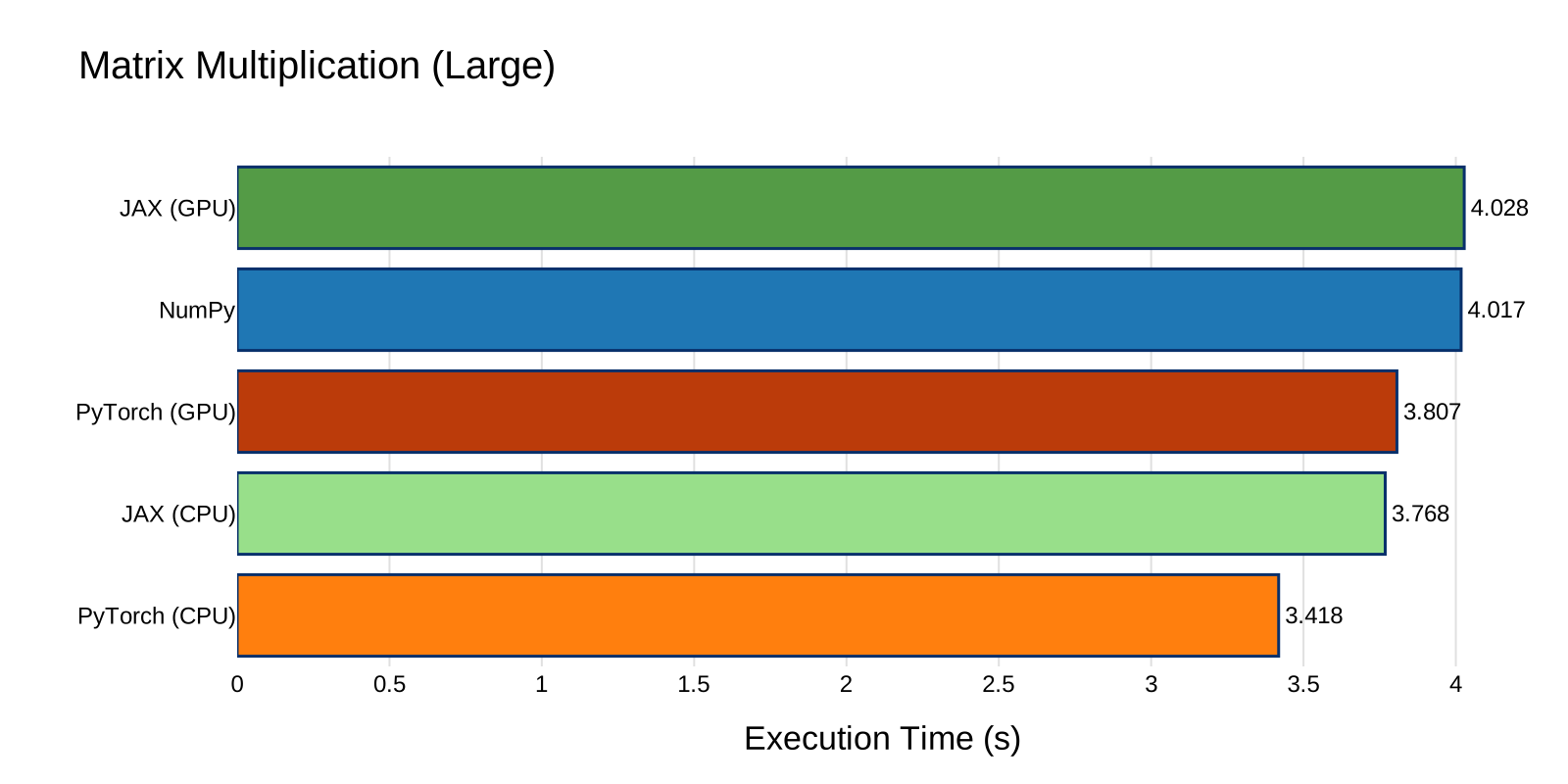
This is where GPU acceleration typically shines. For the \(2000 \times 2000\) case, the computation involves \(2 \times 2000^3 = 16 \times 10^9\) floating-point operations. Of course you can adjust main.py if you have a better GPU than mine.
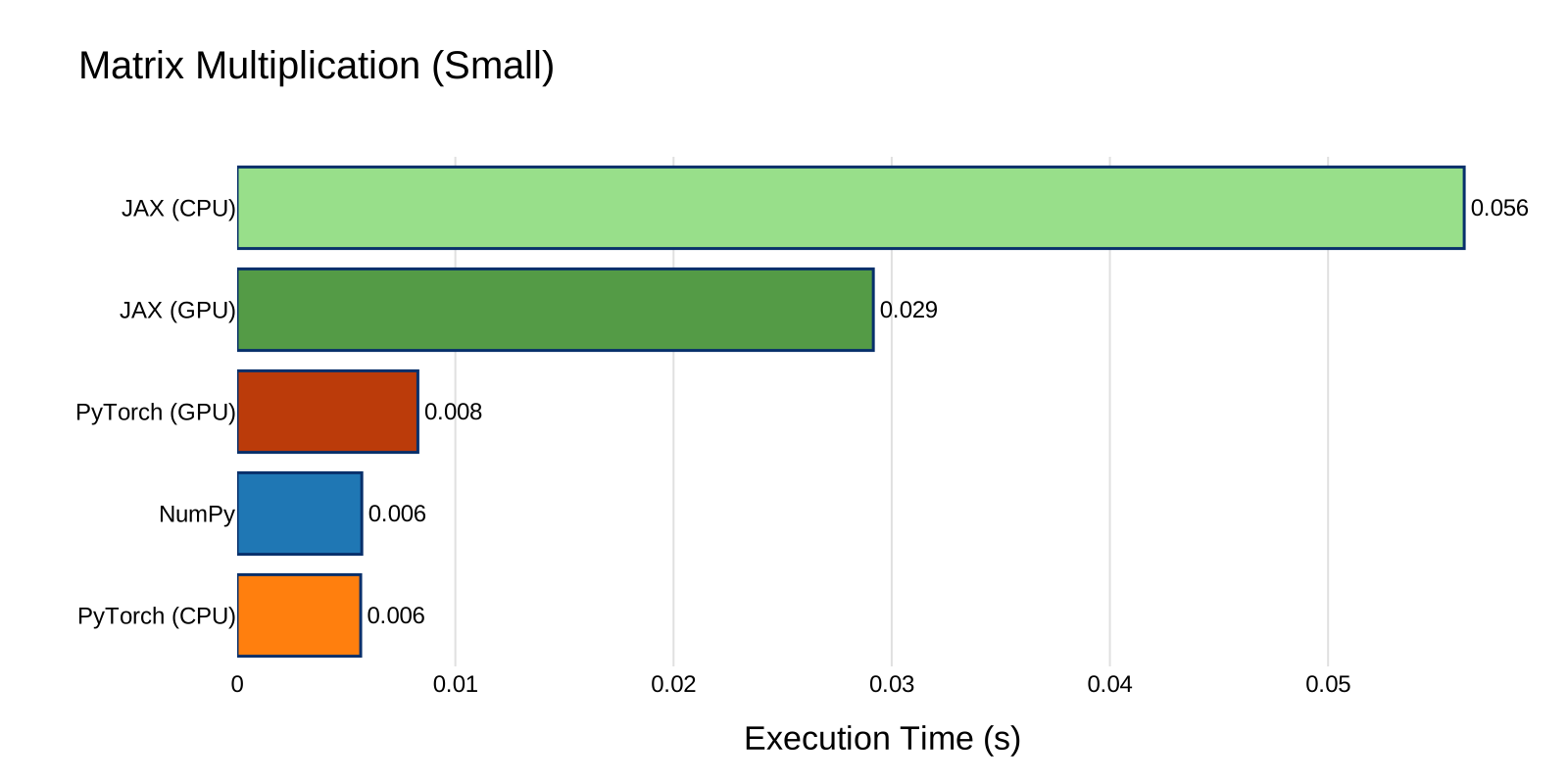
At small scale, NumPy and PyTorch CPU are essentially tied (~5.7 ms), with JAX trailing due to dispatch overhead.
The large-scale results are the most surprising of this entire benchmark: all five configurations land within 15% of each other (3.4 s to 4.0 s). PyTorch CPU is marginally the fastest (3.42 s), while NumPy and JAX GPU are the slowest (~4.0 s). This likely happens because at 2000x2000 float64, all CPU libraries end up calling the same underlying BLAS routines (OpenBLAS or MKL), and the GPU does not have enough work to offset kernel launch overhead. If you know a deeper reason for this convergence, feel free to share it.
3. Gradient Computation#
Automatic differentiation is what sets JAX and PyTorch apart from NumPy. This benchmark compares:
- NumPy: Numerical finite-difference gradient (element-by-element perturbation)
- JAX:
jax.gradwith reverse-mode autodiff - PyTorch:
torch.autogradvia.backward()
Note
NumPy has no built-in autodiff, so we use finite differences (one forward pass per parameter). This is intentionally unfair to highlight why analytical autodiff matters.
The loss function used for this test is:
and the benchmark measures the time to compute \(\nabla_w \mathcal{L}\).
On this test, the setup was as follows:
- Small: vectors of size 100
- Large: vectors of size 10,000
- Iterations: 100 (small), 20 (large)
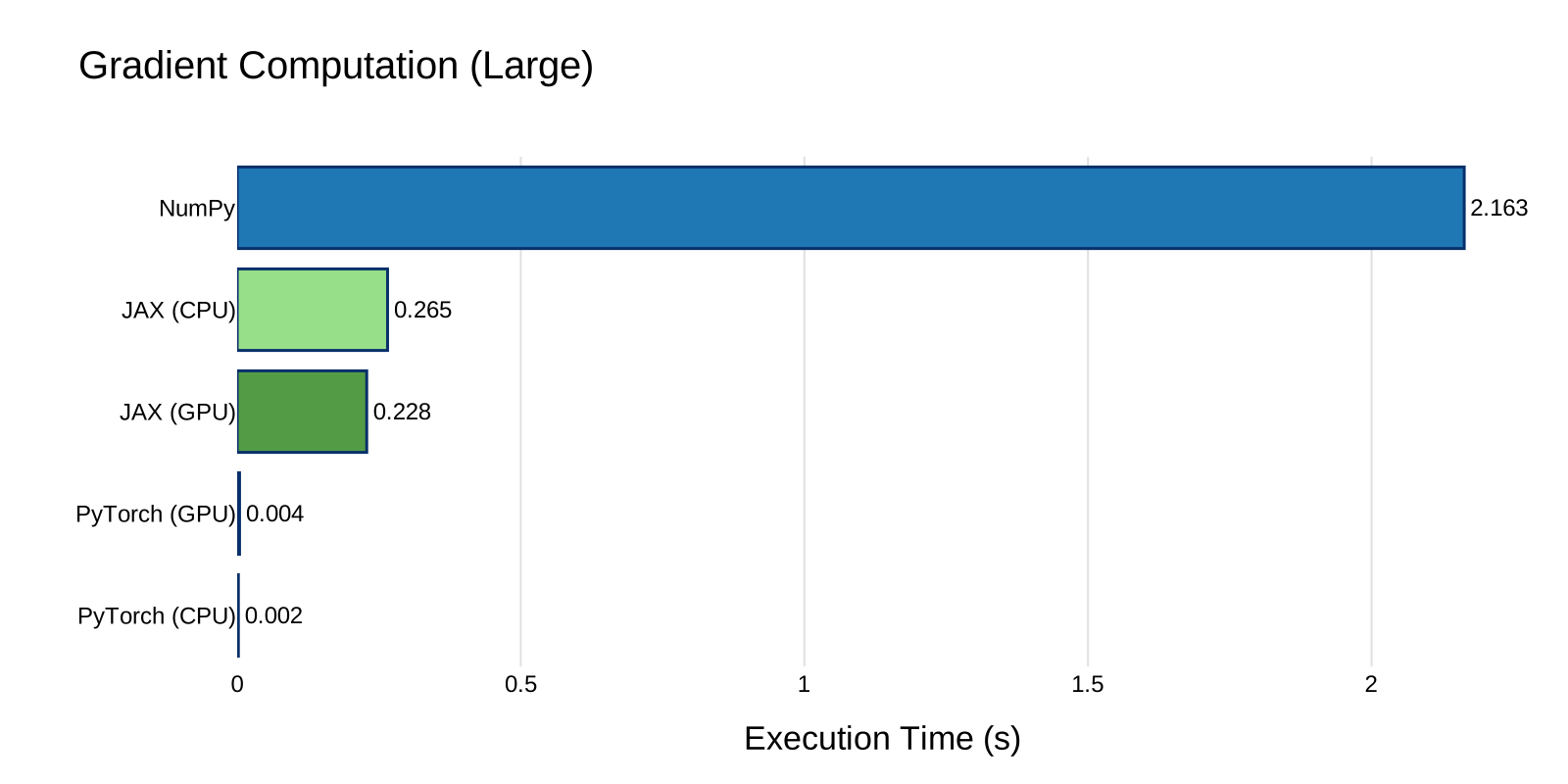
NumPy's finite-difference approach requires \(O(n)\) forward passes (one per parameter), making it dramatically slower as \(n\) grows. JAX and PyTorch compute the full gradient in a single backward pass with \(O(1)\) overhead relative to the forward pass.
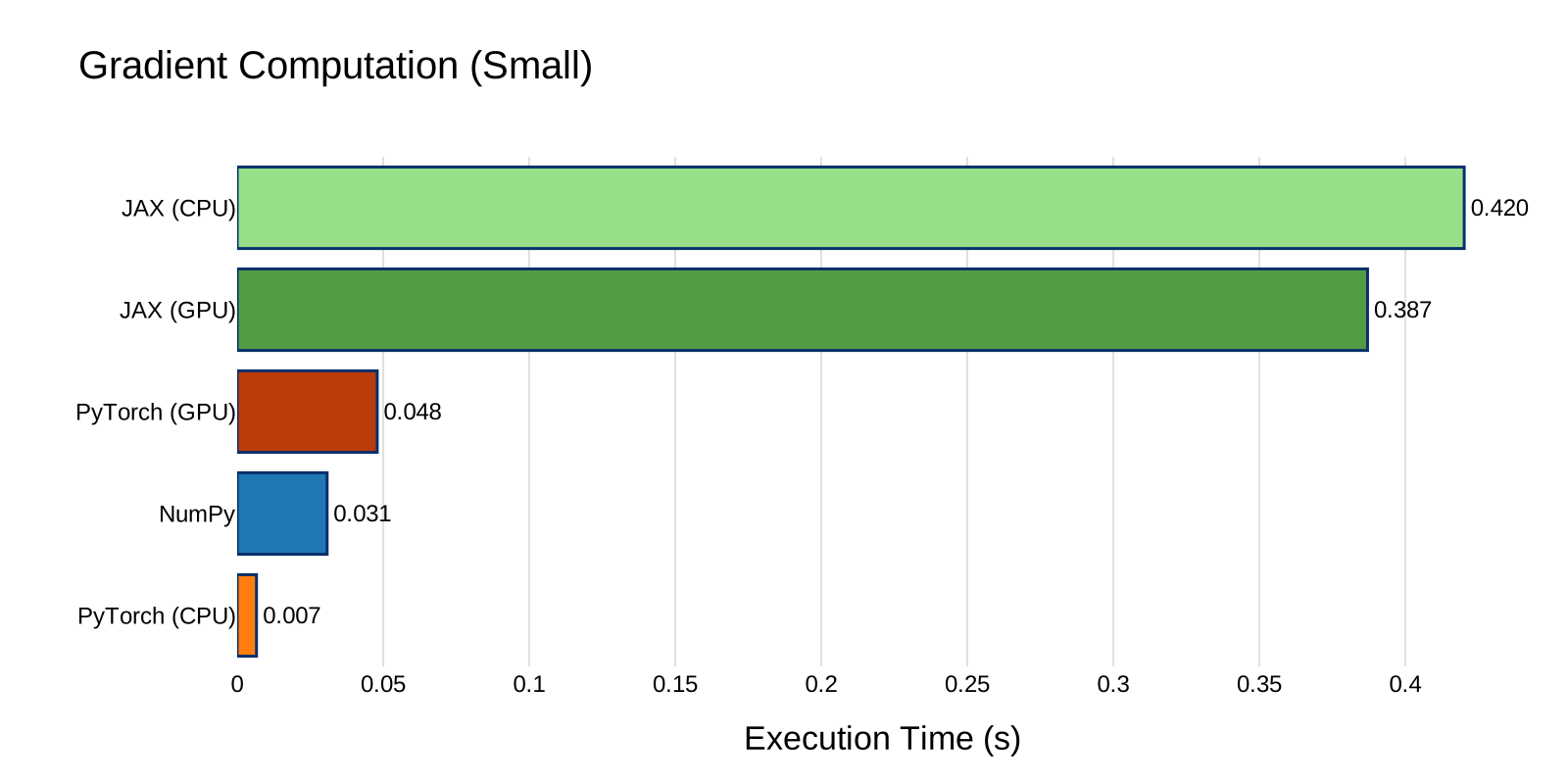
At small scale, PyTorch CPU is the fastest (6.6 ms), followed by NumPy (30.8 ms) which remains competitive despite its O(n) approach. JAX again pays its dispatch tax (~400 ms).
At large scale, the O(n) cost of finite differences becomes devastating: NumPy takes 2.16 s while PyTorch CPU finishes in 2.1 ms, a 1000x difference. PyTorch dominates on both CPU and GPU, with JAX landing in between (~0.25 s).
4. Fast Fourier Transform (FFT)#
The FFT is essential in signal processing, physics simulations, and spectral methods. It has \(O(n \log n)\) complexity and exercises a very different code path than linear algebra routines.
On this test, the setup was as follows:
- Small: arrays of size 1,000
- Large: arrays of size 1,000,000
- Iterations: 500 (small), 50 (large)
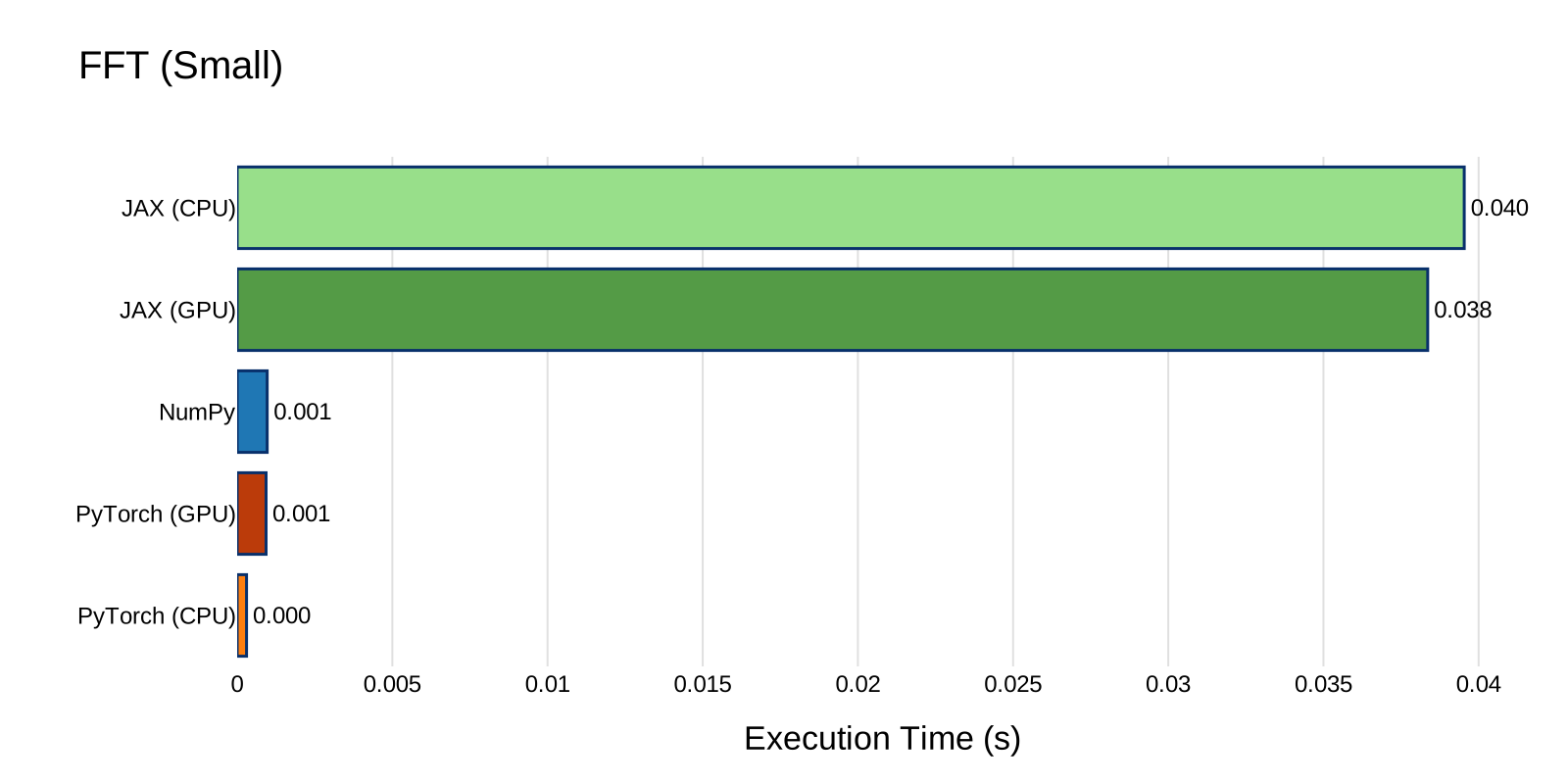
At small scale, PyTorch CPU and NumPy are nearly identical (~5.5 ms), both beating JAX by ~20x.
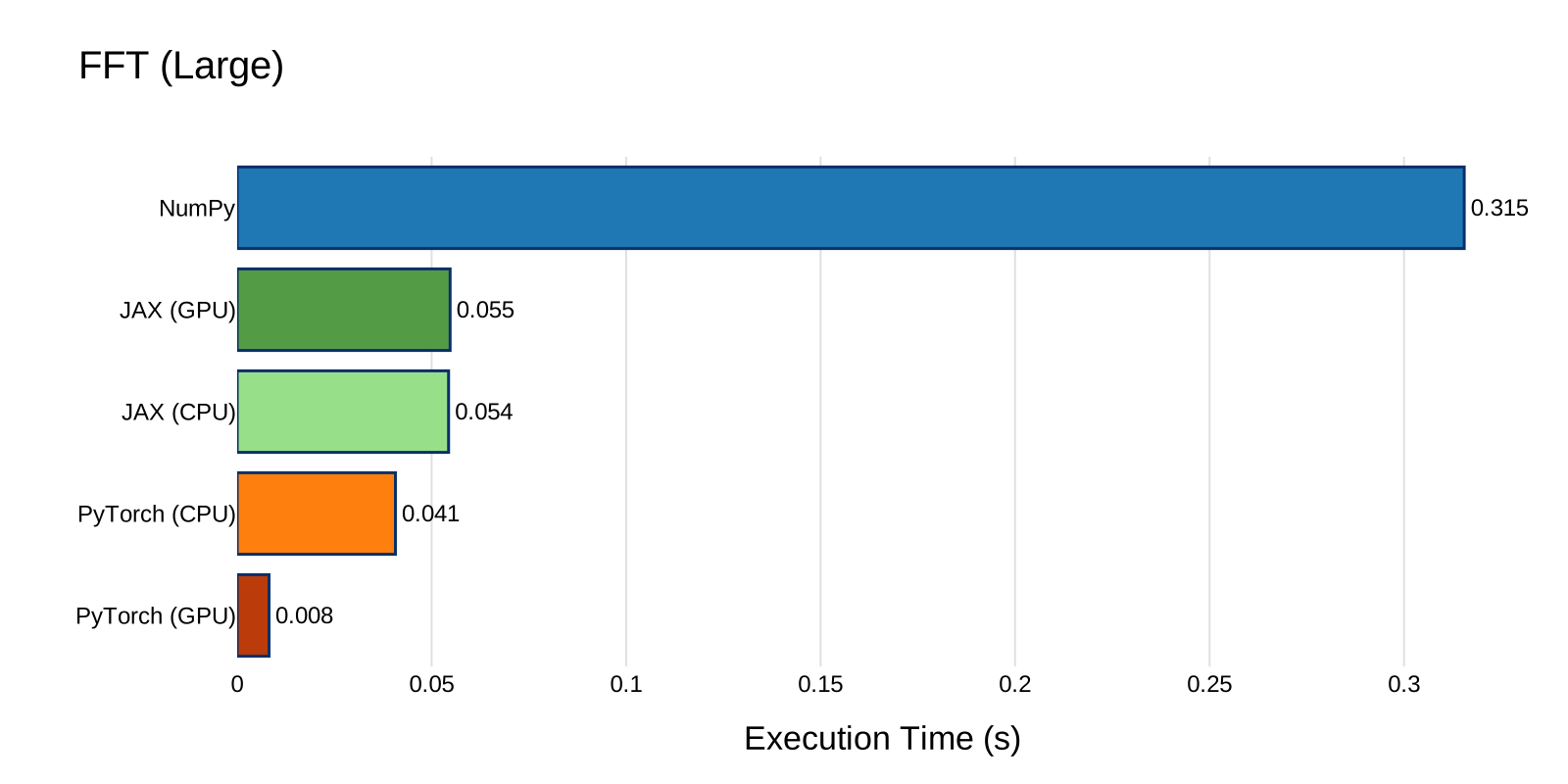
At large scale, PyTorch GPU takes the lead (0.040 s), followed by JAX CPU and GPU (~0.12 s), then PyTorch CPU (0.15 s). NumPy is the slowest at 1.71 s, about 43x slower than PyTorch GPU.
I already knew that PyTorch would be faster than NumPy for FFT, even on CPU. I experienced it on a previous job where switching signal processing pipelines from NumPy to PyTorch yielded significant speedups.
5. Sorting#
Sorting is a comparison-based operation that is difficult to parallelize efficiently. It tests a fundamentally different algorithmic pattern compared to the arithmetic-heavy operations above, as it relies on branching and data-dependent memory access.
On this test, the setup was as follows:
- Small: arrays of size 1,000
- Large: arrays of size 1,000,000
- Iterations: 200 (small), 50 (large)
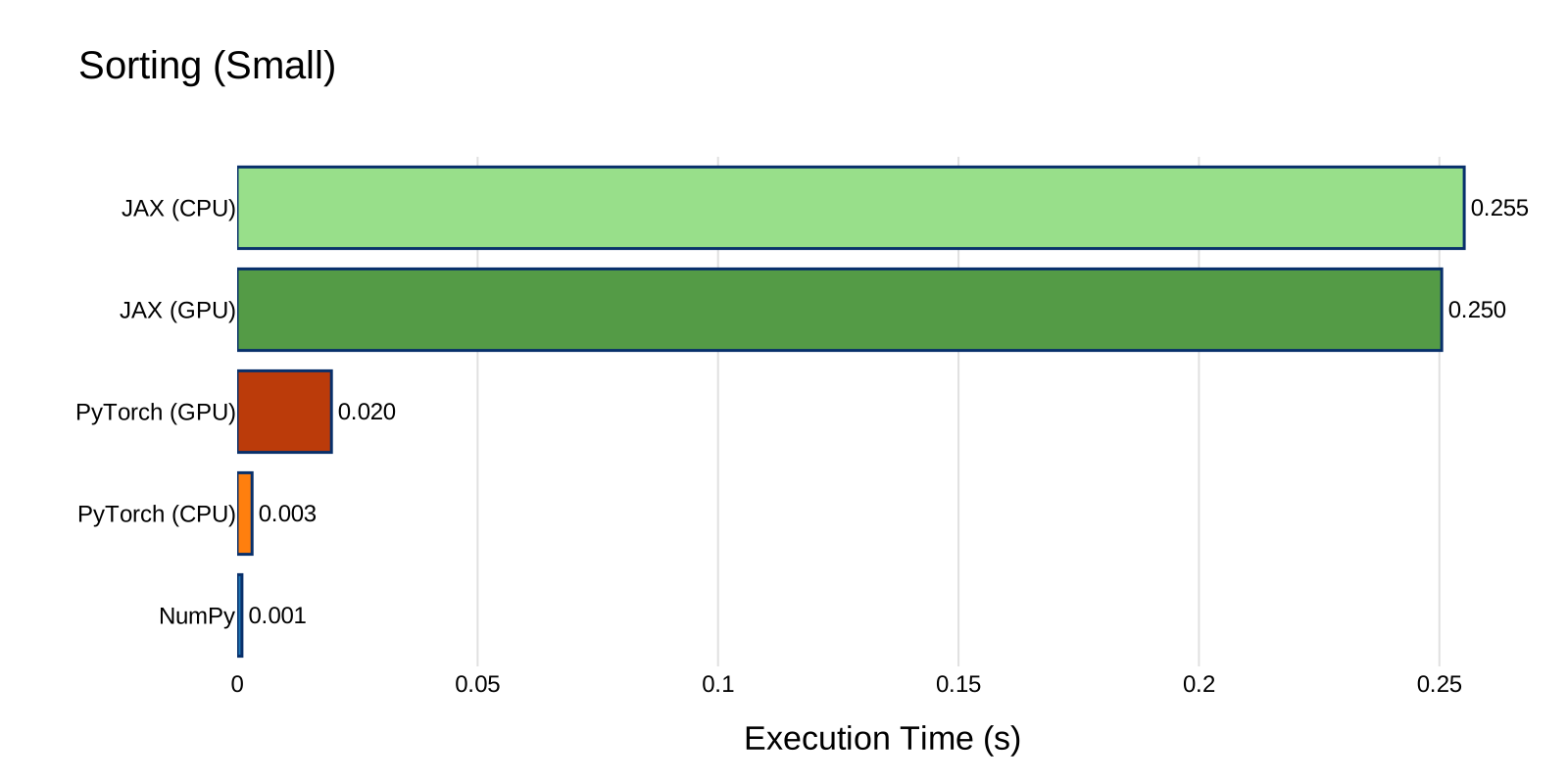
At small scale, NumPy is the fastest (1.0 ms), followed by PyTorch CPU (3.1 ms). JAX is again bottlenecked by dispatch overhead (~250 ms).
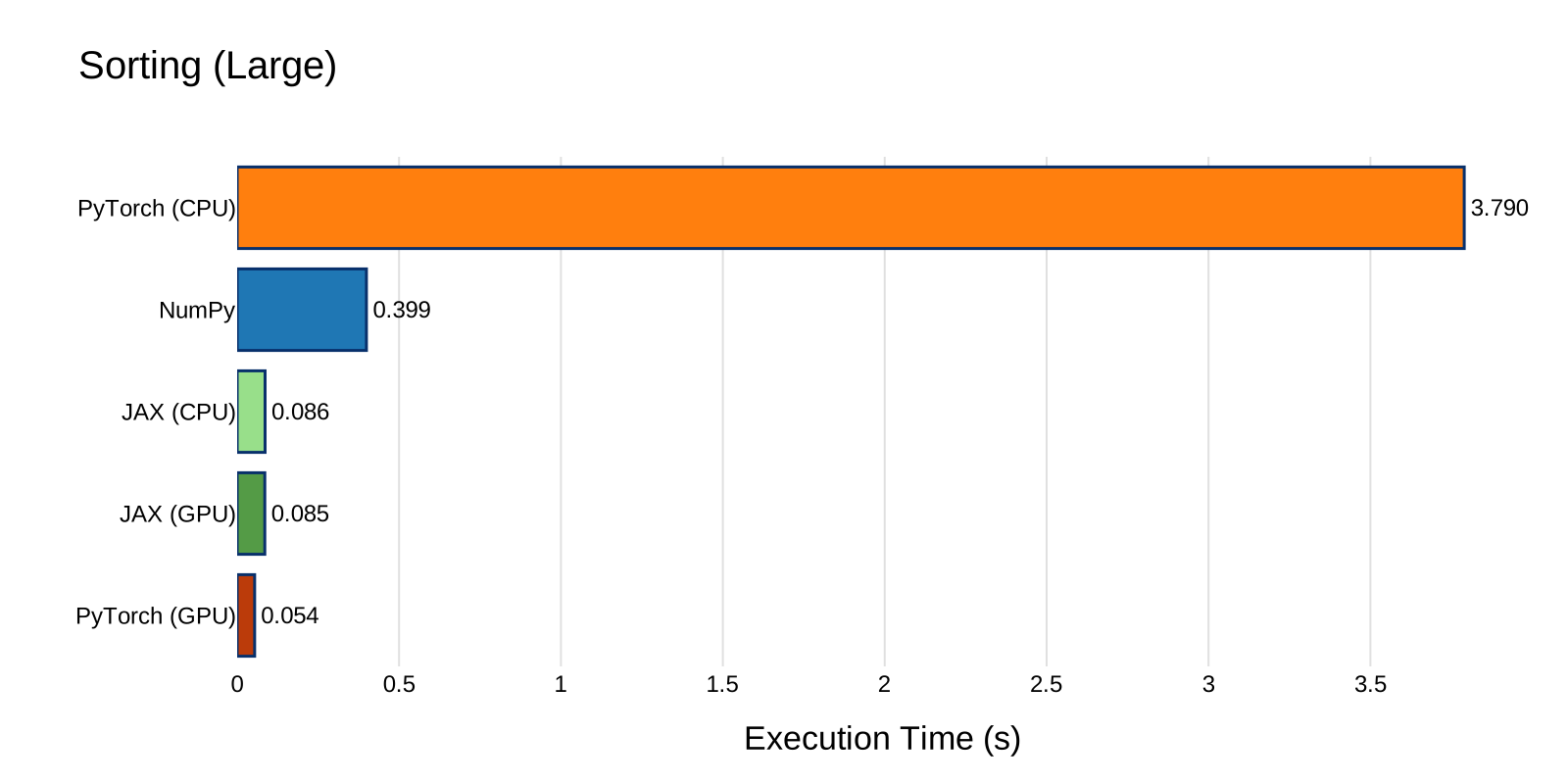
At large scale, sorting reveals a major weakness in PyTorch CPU: it takes 3.79 s, about 9.5x slower than NumPy (0.40 s) and 70x slower than PyTorch GPU (0.054 s). JAX CPU and GPU both perform well (~0.086 s), suggesting its XLA-compiled sort is significantly more efficient than PyTorch's CPU implementation. PyTorch GPU recovers and takes the lead, confirming that the bottleneck is specific to PyTorch's CPU sort path.
Methodology and Pitfalls#
Getting accurate benchmarks from these libraries is harder than it looks. Several subtle issues can produce wildly misleading results if not handled correctly. Take my results with a grain of salt and contribute if you find any error or mistake. Here is what I tried to mitigate errors.
Asynchronous Dispatch#
Both JAX and PyTorch (on GPU) dispatch operations asynchronously.
When you call jnp.matmul(...) or torch.matmul(...), the function returns immediately -- the computation hasn't finished yet.
If you wrap this in timeit naively, you measure kernel launch time (microseconds) instead of execution time (milliseconds).
Fix:
- JAX: Call .block_until_ready() on every result to force synchronous execution.
- PyTorch GPU: Call torch.cuda.synchronize() after each operation group.
Host-to-Device Transfer in the Timed Loop#
A common mistake is converting arrays inside the timed lambda:
# BAD: benchmarks transfer + computation
lambda: jnp.matmul(jnp.array(mat1), jnp.array(mat2))

# GOOD: benchmarks computation only
jnp_mat1 = jnp.array(mat1)  # pre-allocated
jnp_mat2 = jnp.array(mat2)
lambda: jnp.matmul(jnp_mat1, jnp_mat2).block_until_ready()
All tensors and arrays are pre-allocated on the target device before timing begins, so the benchmarks measure pure computation.
Gradient Accumulation#
PyTorch accumulates gradients by default. If you reuse a tensor with requires_grad=True across multiple .backward() calls without zeroing gradients, you get incorrect values and increasing memory usage. The benchmark creates a fresh tensor for each iteration to avoid this.
JIT Warm-up#
JAX traces and compiles functions on their first call via XLA. The first invocation is significantly slower than subsequent ones. The benchmark uses enough iterations (100-500 for small, 20-50 for large) that the compilation cost is amortized, though a dedicated warm-up call could further improve accuracy. This means JAX numbers in this benchmark include a small JIT overhead penalty, especially on lower-iteration benchmarks.
Summary#
Small vs. Large: The Overhead Story#
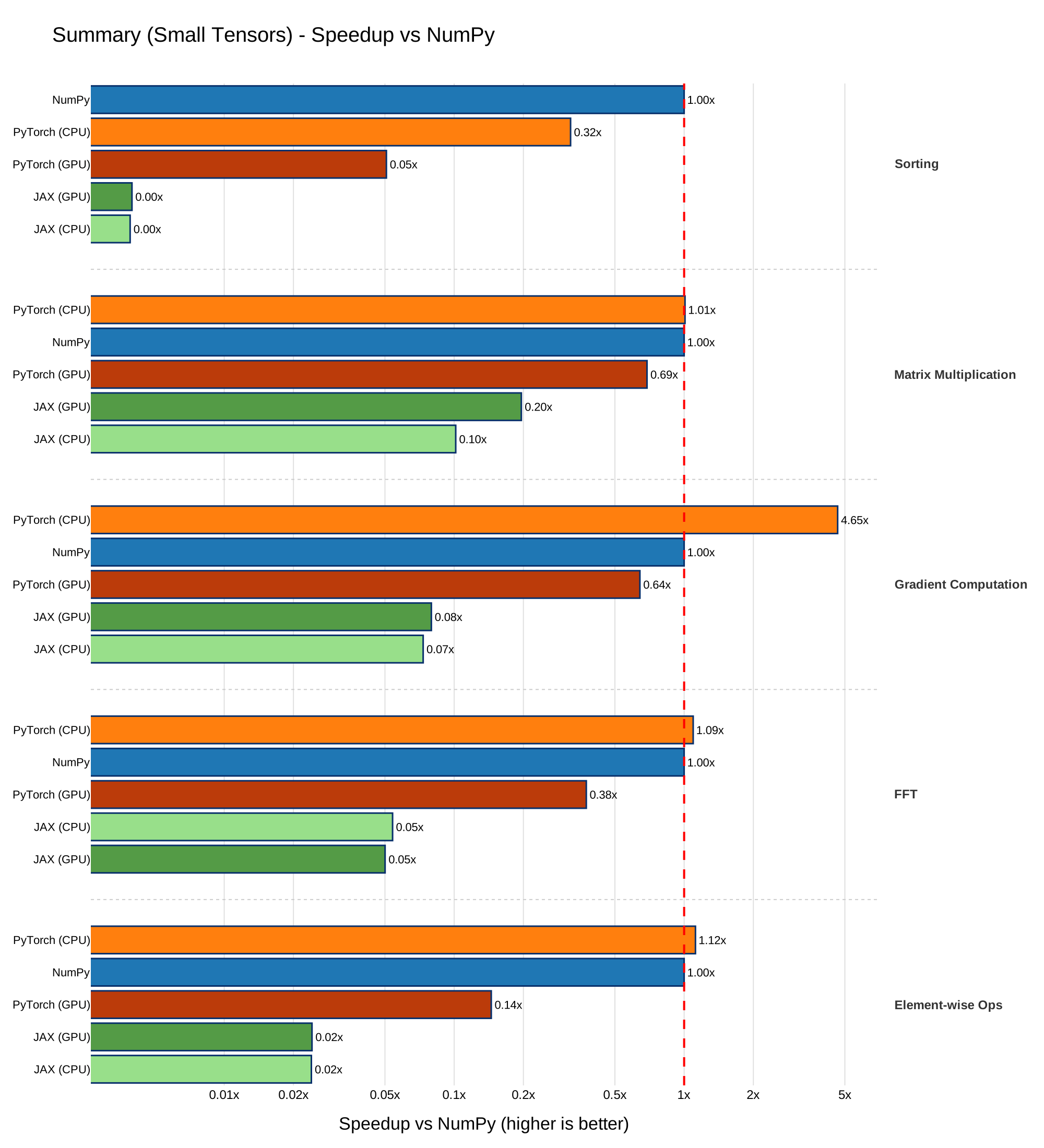
At small sizes, the story is about overhead: Python function call cost, kernel launch latency, JIT compilation. NumPy, with its thin C extension layer, often has the lowest overhead, and PyTorch CPU is consistently close. JAX pays a significant dispatch tax on every benchmark at small scale.
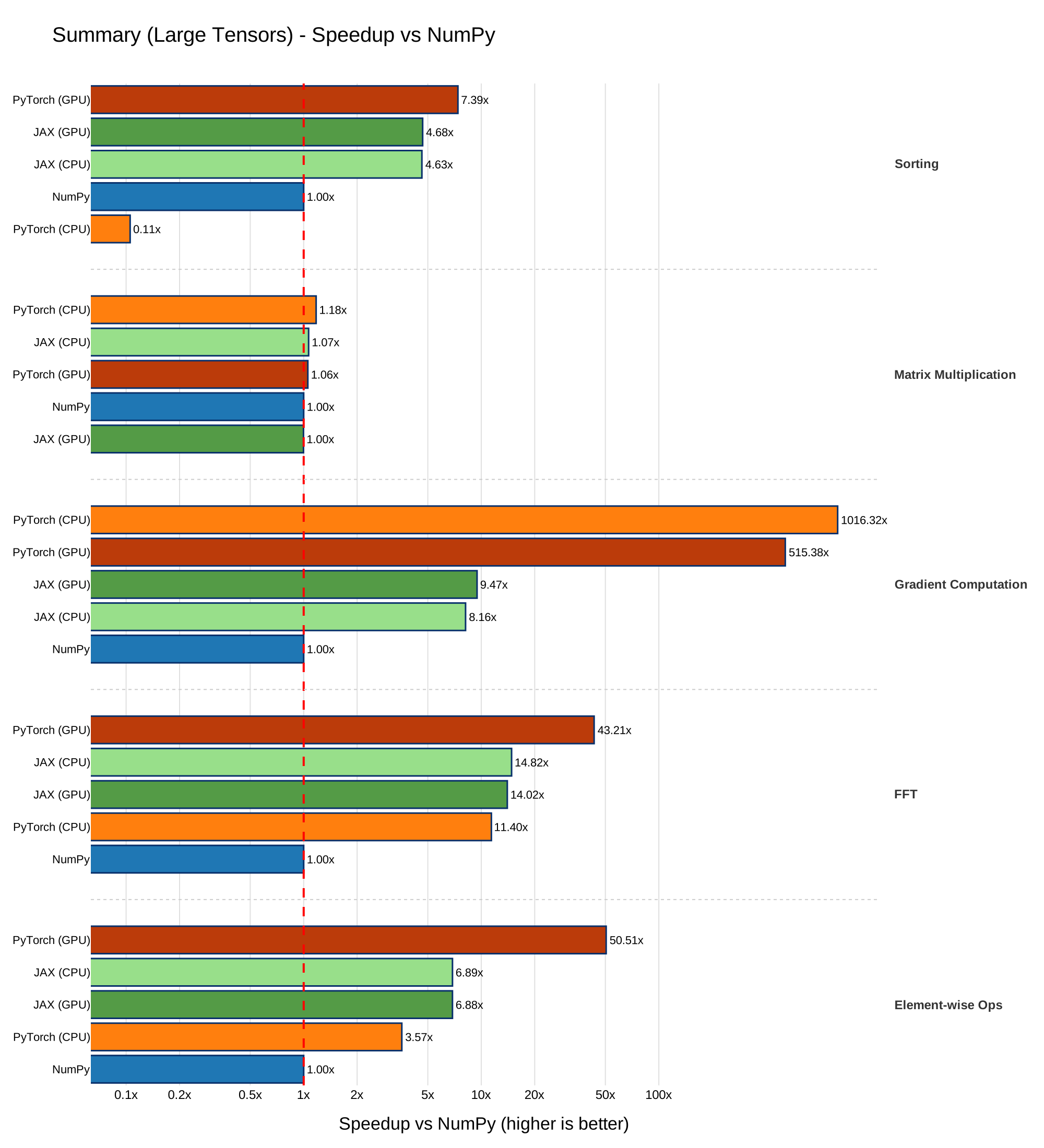
At large sizes, the story flips to throughput: SIMD width, memory bandwidth, GPU parallelism. This is where JAX's XLA compiler and PyTorch's CUDA kernels pull ahead.
Here is a summary of the situation on my setup:
Running the Benchmarks#
The benchmark suite is packaged as a Python module and can be run from the command line:
uv run main.py --output-dir benchmark_plots
This will:
- Run all five benchmark categories at both small and large tensor sizes (10 benchmark configurations total).
- Generate comparison plots as SVG files in the specified output directory.
The --output-dir flag controls where the resulting plots are saved (defaults to benchmark_plots/).
Conclusion#
No single library is universally fastest. The right choice depends on your workload. Despite that, I default to PyTorch on many of my projects.
Warning
This benchmark does not take into account the accumulation of asynchronous operations that PyTorch and JAX can achieve.
The key takeaway: always benchmark on your actual workload and hardware, and don't expect NumPy to be the best solution even on small tensors.
Thanks for reading, I hope it was insightful and inspiring.
If you have any remarks or suggestions feel free to share your ideas/advice.